



In most businesses, documents arrive from multiple channels, but email remains one of the most common. Vendor invoices, contracts, client submissions, and bank statements frequently arrive as email attachments. Manually downloading and processing these files is time-consuming, prone to errors, and slows down essential workflows such as accounts payable, compliance, and customer onboarding.
Docspire’s Email Source integration allows organizations to automate document intake directly from email. By connecting your mailbox to Docspire, attachments are automatically downloaded, processed, and routed according to your workflow rules. This reduces manual effort, speeds up processing, and ensures accuracy across document-driven operations using email document automation.
What is Docspire Email Source integration?
Docspire Email Source integration is an email document automation solution that connects to your mailbox through IMAP, automatically extracts attachments, and sends them into Docspire’s processing pipeline for classification, data extraction, validation, and workflow automation.
The Challenge
Documents arriving via email require manual handling, including downloading attachments, renaming files, and uploading them into systems. This process is time-consuming, inconsistent, and difficult to scale across finance, legal, and operations teams.
These inefficiencies are especially visible in accounts payable processes, where high invoice volumes and format variations create delays. Many organizations face similar issues highlighted in this guide on AP pipeline inefficiencies and recovery strategies, and common mortgage document automation mistakes.
The Solution
Docspire’s Email Source integration connects directly to your mailbox and automates document intake. Attachments are automatically extracted and processed, then routed based on workflow rules to ensure faster processing and improved accuracy.
By combining IMAP ingestion with AI document processing from email, Docspire enables scalable document workflow automation across business operations.
Ready to Automate Email Document Processing?
Get in Touch for a Demo
What is Email Source Integration?
Email Source is a feature in Docspire that automates the extraction of email attachments from connected inboxes using IMAP, supporting both basic and modern authentication.
It continuously monitors selected folders and feeds incoming documents directly into the processing pipeline for classification, data extraction, validation, and workflow automation. This approach is powered by techniques similar to context-aware AI for document accuracy, ensuring reliable handling of document variations.
This is useful for:
- Accounts payable teams processing vendor invoices
- Finance teams managing bank statements and reports
- Legal teams handling contracts and compliance documents
- Customer teams processing forms and applications
How Email Source Works
Docspire automates email attachment processing automation through a simple workflow:
- Connect your email account using IMAP
- Select folders to monitor for incoming emails
- Optionally apply filters on sender email addresses or subject keywords
- Automatically extract attachments from new emails
- Send documents into Docspire’s processing engine
- Apply classification, extraction, and validation rules
- Route structured data to downstream systems
This eliminates manual downloading, renaming, and uploading while ensuring consistent automated document intake from email.
Turn Email Attachments into Structured Data
See Docspire in ActionSetting Up Email Integration
Setting up Email Source integration in Docspire is a guided process that connects your email account and enables automated document intake.
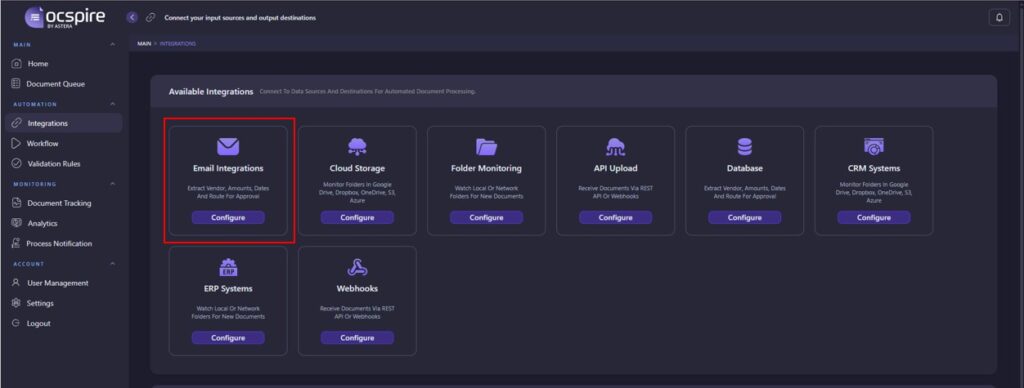
Step 1: Open Email Integration Settings
- Navigate to Automation → Integrations in the left sidebar. Locate the Email Integrations card in the Available Integrations section and click Configure.
Step 2: Choose Authentication Method
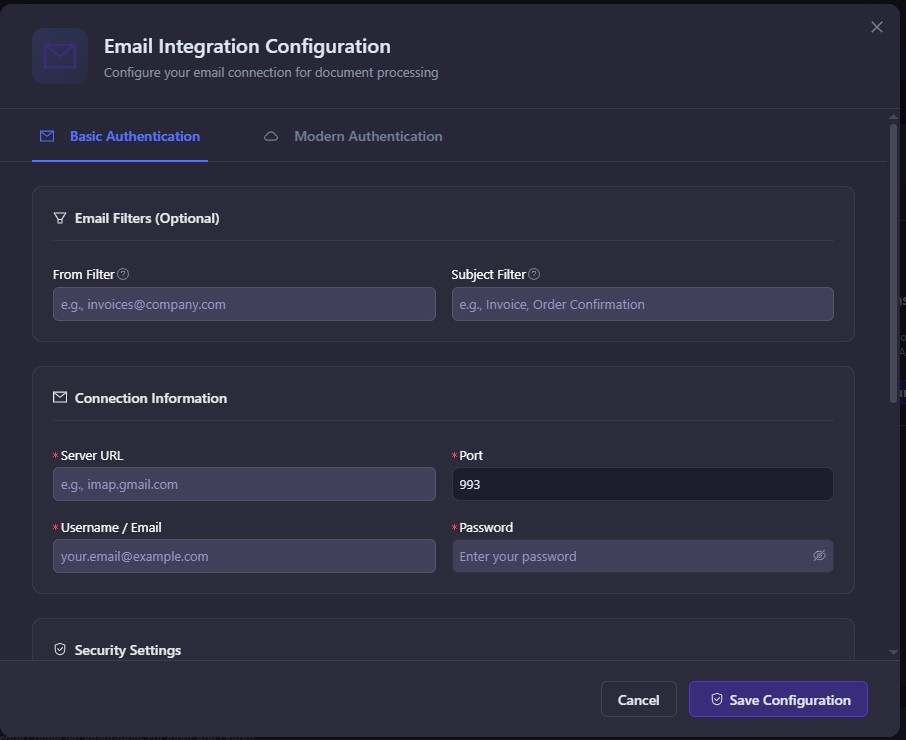
Select one of the following options:
Basic Authentication
Uses a standard username and password. Suitable for email servers that support IMAP authentication.
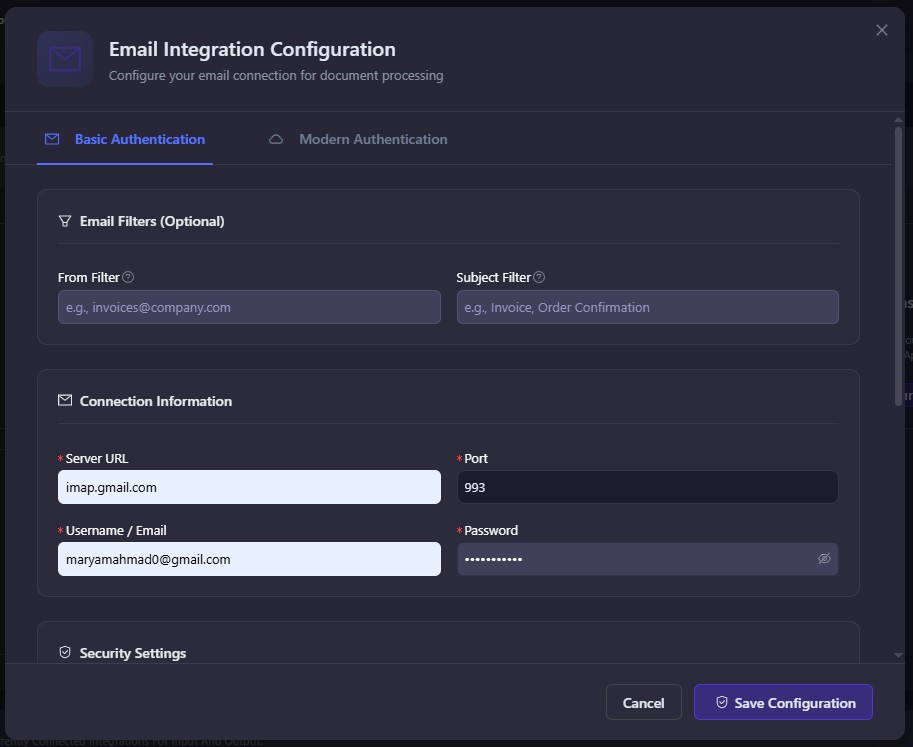
Step 3: Apply Email Filters (Optional)
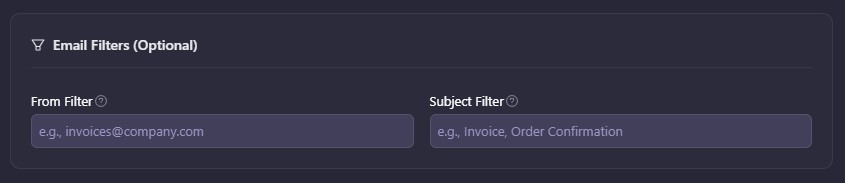
Define which emails should be processed:
- From Filter: Process emails only from specific senders such as [email protected]
- Subject Filter: Process emails containing specific keywords such as Invoice or Order Confirmation
Step 4: Configure Connection Details
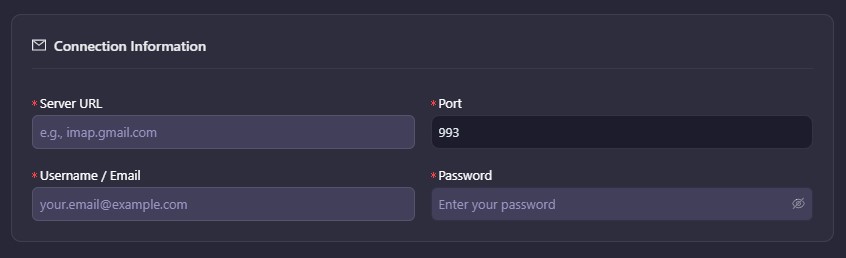
Enter your email server information:
- Server URL, such as imap.gmail.com
- Port number, typically 993 for secure connections
- Username or email address
- Password or app-specific password
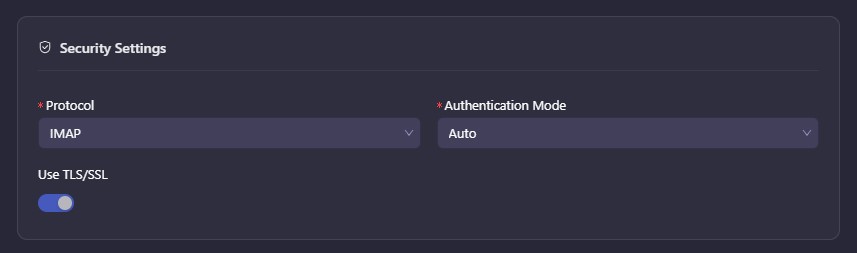
Step 5: Configure Security Settings
Set secure access options:
- Protocol: IMAP
- Authentication Mode: Auto (recommended)
- TLS/SSL: Enabled (recommended)
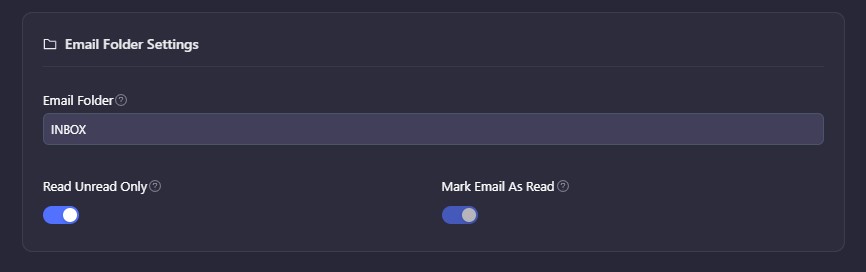
Step 6: Define Folder Behavior
Control how emails are processed:
- Email Folder: Select folder such as INBOX
- Read Unread Only: Process only unread emails
- Mark Email As Read: Prevent duplicate processing
Step 7: Save and Validate
Click Save Configuration to establish the connection.
Docspire will validate your settings and confirm once the integration is successfully active.
Use Cases
Accounts Payable Automation
Automate invoice ingestion from multiple vendors and reduce manual entry while improving cycle times. This becomes especially valuable when handling multi-line invoice processing automation and improving AP invoice matching accuracy. Organizations can also evaluate tools through this list of best AI AP automation platforms or explore broader insights in the AP automation report 2026 and complete AP automation guide.
Bank Statement Processing
Automatically capture financial documents and streamline reconciliation workflows.
Legal Document Processing
Process contracts and agreements automatically while improving compliance and reducing risks using techniques similar to AI document fraud detection.
Customer Form Intake
Automate the processing of applications and onboarding requests received via email.
Key Capabilities
- IMAP-based email integration
- Automated attachment extraction
- Folder-level monitoring
- Email filtering by sender and subject
- Intelligent classification and data extraction
- Secure authentication using OAuth 2.0 and TLS
- Automated routing into downstream systems
These capabilities align with modern invoice automation from email and scalable document ingestion systems.
Prerequisites
- IMAP-enabled email account
- IMAP server URL and port
- Email credentials or app-specific password
- MFA-compatible app password
Supported Email Providers
| Provider | Server | Port | TLS |
| Gmail | imap.gmail.com | 993 | Yes |
| Microsoft 365 | outlook.office365.com | 993 | Yes |
| Yahoo | imap.mail.yahoo.com | 993 | Yes |
| Zoho | imap.zoho.com | 993 | Yes |
Best Practices
- Use a dedicated inbox for document intake
- Enable app-specific passwords
- Filter emails to reduce noise
- Enable “Mark Email As Read”
- Monitor integrations regularly
Troubleshooting
- Connection failed: Check IMAP settings and TLS configuration
- Authentication error: Verify credentials
- No emails processed: Check filters and folder selection
- Duplicate documents: Enable “Mark Email As Read”
Get Started
Automating document intake from email is a foundational step toward eliminating manual workflows and improving operational efficiency.
With Docspire’s Email Source integration, documents are captured, processed, and routed automatically using email to workflow automation systems and intelligent processing.
Start streamlining your document workflows today.
Simplify Document Intake from Email
Get Started with Docspire