



The Real Cost of Manual Document Ingestion
Every modern business runs on multiple systems: CRMs, billing platforms, customer portals, and ERP tools. Each generates documents constantly, including invoices, onboarding forms, contracts, KYC submissions, and reports. The problem is not a shortage of documents. The problem is getting them into the right place at the right time.
According to IDC, organisations lose an average of 21.3% of productivity due to document-related inefficiencies. When document ingestion is manual—whether that means downloading a file or waiting for a scheduled batch job—delays compound. This friction is a hallmark of legacy vs AI document management systems, where manual handling creates bottlenecks that modern automation is designed to solve.
Webhook-driven document ingestion eliminates this lag entirely. The moment a document is created anywhere in your ecosystem, it is automatically delivered to Docspire and processing begins. No polling, no manual uploads, no batch delays.
What Is Webhook Document Ingestion?
A webhook is an event-driven HTTP request that one system sends to another the moment something happens. Rather than repeatedly asking whether new data is available (polling), the source system pushes the data as soon as it is ready.
Webhook document ingestion enables real-time, automated processing by sending documents the moment they are created—eliminating manual uploads, delays, and operational bottlenecks.
In plain terms: A webhook works like a courier arriving the moment a package is ready, rather than you checking the letterbox every five minutes. The document arrives in Docspire the instant it is created, without any human in the loop.
In the context of document processing, webhook ingestion means your CRM, billing tool, or internal application sends documents directly to Docspire via a secure HTTP POST request. Docspire receives the file, classifies it, and performs unstructured data extraction to make the results available before a human operator would have even opened their email.
Webhooks Vs. Manual Ingestion: A Direct Comparison
| Manual / polling approach | Webhook document ingestion |
| Check for new files manually | Documents arrive the instant they are created |
| Batch processing with delays | Processing starts immediately on receipt |
| Email forwarding and manual uploads | Zero manual intervention required |
| No real-time pipeline visibility | Full real-time status in the Docspire queue |
| Compliance risks from processing lag | Continuous, auditable pipeline with no gaps |
Why Webhook Document Ingestion Matters for Your Workflows
Document workflows are time-sensitive by nature. An invoice that sits in an email inbox for 24 hours represents a 24-hour delay in your accounts payable cycle. This is particularly evident when comparing operations against accounts payable performance benchmarks 2026, which show that ingestion speed is a primary driver of efficiency.
Webhook ingestion transforms document workflows from a reactive, human-dependent process into a proactive, always-on pipeline. Because every document is ingested the moment it is created, your team works from a live, current data set.
For organisations processing thousands of documents, the compounding effect is significant. Automating these workflows can reduce processing costs by 40 to 75 percent. Webhooks are the entry point to that automation: the mechanism that ensures no document ever waits to be processed.
How Docspire Webhook Document Ingestion Works: Step by Step
Docspire’s webhook integration turns document ingestion into a fully automated, event-driven pipeline. Here is exactly what happens from the moment a document is created to the moment structured data is available.
Step 1: A Document Is Created in an External System
This could be a customer uploading a file in your onboarding portal, an invoice generated by your billing platform, a contract exported from your CRM, or a report produced by an internal tool. The source system does not matter. If it can make an HTTP request, it can send documents to Docspire.
Step 2: The External System Fires a Webhook
As soon as the document is ready, the source system sends an HTTP POST request to your Docspire webhook endpoint, attaching the file as multipart/form-data and authenticating the request with your secret key in the X-Docspire-Secret header.
Step 3: Docspire Receives and Queues the Document
Docspire validates the incoming request, confirms the secret key, and immediately places the document into the processing queue. A documentId is returned in the response so you can track processing status programmatically.
Step 4: Automatic Classification and Extraction
Docspire’s processing engine classifies the document type, extracts structured data fields, validates values against your configured business rules, and flags anything that requires human review. For most standard document types, this completes in seconds. For difficult files, the system utilizes adaptive OCR processing for scanned documents to ensure accuracy.
Step 5: Results Are Available in Real Time
Processed data is immediately accessible in the Docspire UI under Document Queue, via the results API endpoint, or pushed downstream to your connected systems through a configured webhook output. If a field requires adjustment, the system supports feedback-based document reprocessing, allowing the engine to learn from human corrections.
Automate Real-Time Document Ingestion with Docspire
Start a Free Trial
Real-World Use Cases For Webhook Document Ingestion
-
Invoice And Accounts Payable Automation
Finance teams processing high volumes of supplier invoices use Docspire webhooks to connect their billing platform directly to the extraction pipeline. The moment an invoice is generated or received, Docspire’s AI-driven finance automation extracts vendor name, invoice number, line items, total amount, and due date, pushing the structured data straight into the accounting system. What previously required a team member to download, upload, and verify each invoice becomes entirely hands-free.
-
Customer Onboarding And KYC
When users submit identity documents, proof of address, or compliance paperwork through an onboarding portal, the portal fires a webhook to Docspire the moment the upload is complete. Docspire validates the documents, extracts the relevant fields, and returns results, allowing onboarding workflows to continue automatically rather than waiting for an analyst to review the file.
-
CRM-Triggered Document Processing
Sales and customer success teams often generate or receive documents directly within their CRM: signed contracts, statements of work, or customer-provided forms. A webhook integration ensures that as soon as a document is attached or generated in the CRM, it is instantly available as structured data in Docspire, searchable and ready to trigger downstream automations.
-
Internal Reporting and Data Pipelines
Internal tools that generate structured reports, audit logs, or operational files can use webhooks to feed Docspire continuously. Rather than scheduling a daily export job, the internal tool pushes each file as it is produced, keeping downstream dashboards and analytics systems current without any manual intervention.
How To Set Up Webhook Document Ingestion in Docspire
Setting up Docspire’s webhook integration takes less than five minutes. The following steps walk through the complete configuration process.
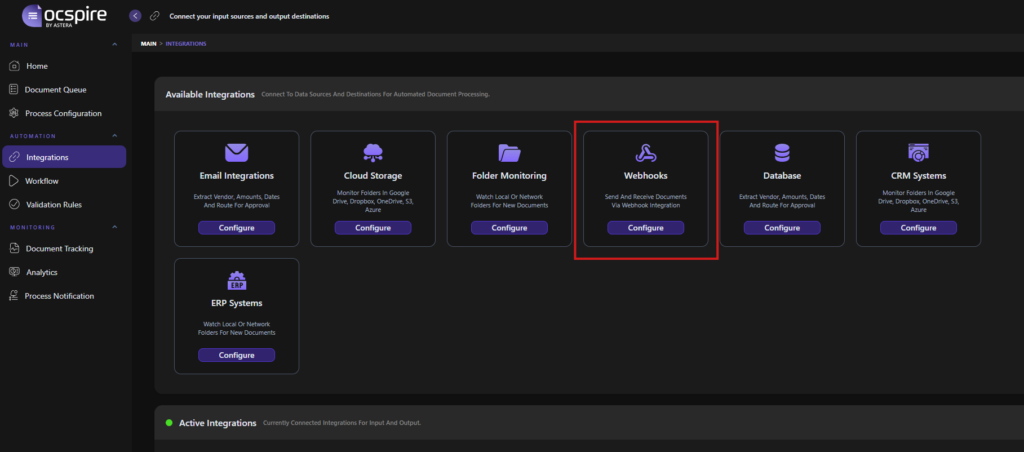
Step 1: Navigate To Webhook Configuration
In the Docspire dashboard, go to Automation > Integrations in the left sidebar, locate the Webhooks card in the Available Integrations section, and click Configure.
Step 2: Select Webhook Input And Generate Credentials
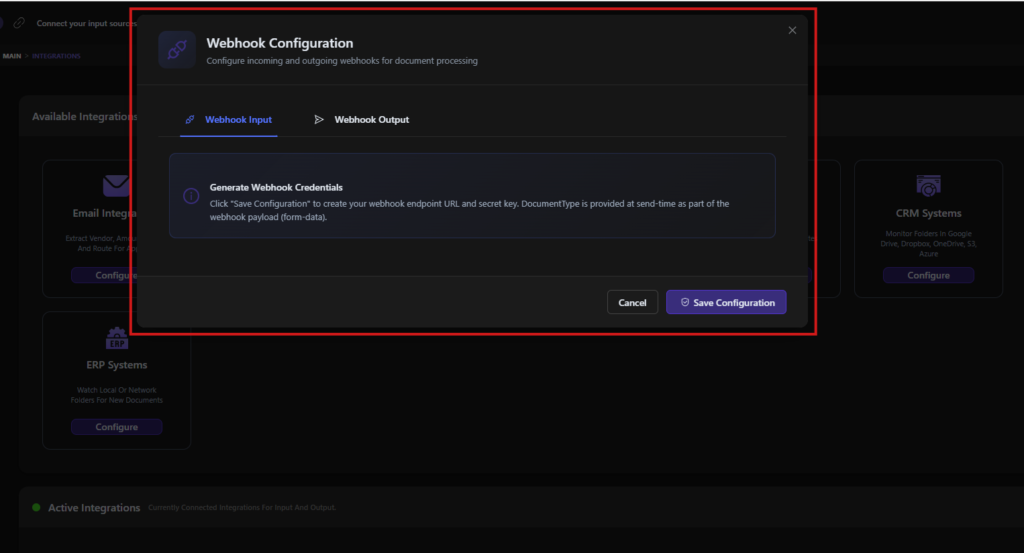
In the configuration dialog, select the Webhook Input tab, then click Save Configuration. Docspire generates two credentials you will need to copy and store securely:
- Webhook URL: the endpoint to which your external system sends documents.
- Secret key: used in the X-Docspire-Secret header to authenticate every incoming request.
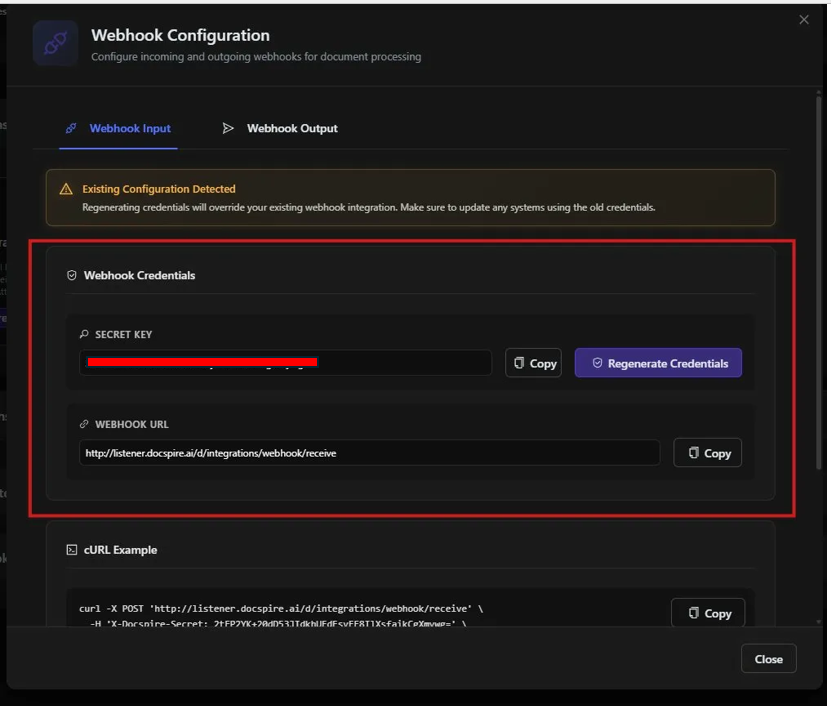
Once generated, both credentials are displayed in the Webhook Credentials section. Use the Copy buttons to copy each value. A ready-to-use cURL example is also provided for quick testing.
Step 3: Configure Your External System
In the application that will be sending documents, configure it to make an HTTP POST request to your Docspire webhook URL with the following requirements:
- Method: POST
- Content-Type: multipart/form-data
- Header: X-Docspire-Secret with your secret key value
- Body: file attached under the field name ‘files’ (plural)
Optional fields you can include in the same request are DocumentType (to specify the document category), AllowedDocumentTypes (a comma-separated allow-list), and BusinessId (an alphanumeric identifier up to 50 characters).
Step 4: Test with Postman or cURL
Before going live, verify the integration using Postman or the cURL example provided in the credentials panel. Create a POST request to your webhook URL, add the X-Docspire-Secret header, attach a test document under the files field in form-data, and send. Docspire will return a documentId and a status confirmation.
Results endpoint: GET https://server.docspire.ai/d/integrations/webhook/process/{documentId}. Include your X-Docspire-Secret header. The response includes extracted structured data, field-level confidence scores, processing status, and validation results.
Step 5: Verify In the Document Queue
Navigate to Main > Document Queue in the Docspire UI to confirm your test document has appeared. Status indicators show Running (actively processing), Success (complete), or In Review (flagged for human validation). Click View Results to see the full extraction output.
Rotating Your Credentials
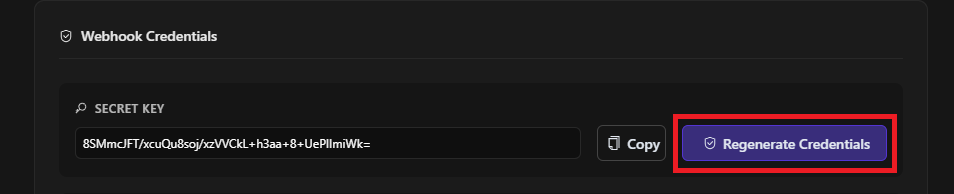
If you need to rotate your credentials, click the Regenerate Credentials button in the Webhook Input configuration panel. Note that regenerating credentials immediately invalidates your existing secret key. Update every connected external system straight away to avoid dropped documents.
Automate Real-Time Document Ingestion with Docspire
Start a Free TrialConfiguring Webhook Output: Sending Data to External Systems
In addition to receiving documents, Docspire can push processed document data to external systems automatically via webhook output. This is how structured data extracted from ingested documents flows back into your CRM, ERP, database, or any other destination that accepts HTTP requests.
To configure webhook output, open the same configuration dialog (Automation > Integrations > Webhooks > Configure), select the Webhook Output tab, and fill in the endpoint details.
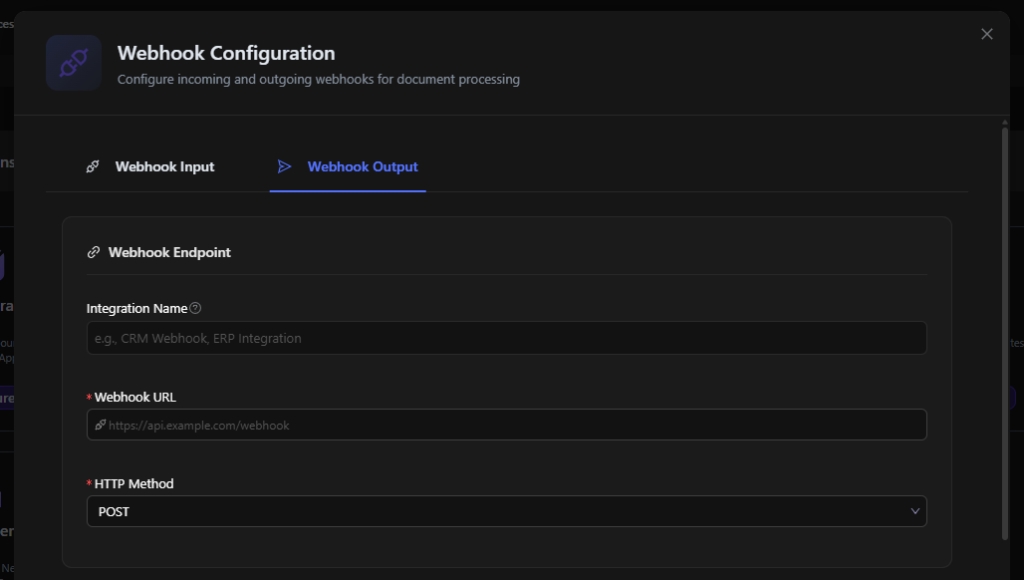
You will need to provide the destination URL and select an HTTP method (typically POST). Giving the integration a descriptive name such as ‘CRM Webhook’ or ‘ERP Integration’ makes it easy to identify in the Active Integrations list.
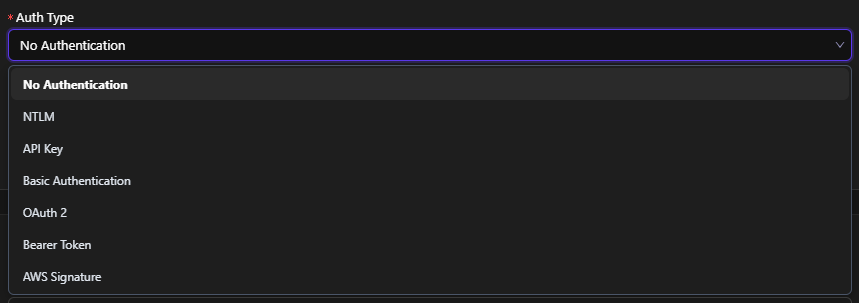
Docspire supports seven authentication types for outbound webhook requests, covering most enterprise systems: No Authentication, NTLM, API Key, Basic Authentication, OAuth 2, Bearer Token, and AWS Signature. Select the method that matches your destination system and supply the required credentials.
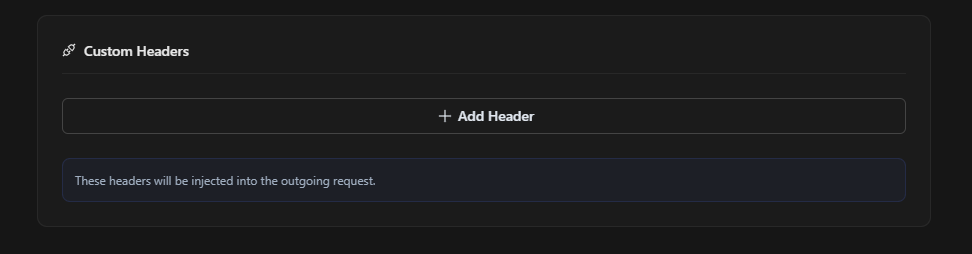
If your destination requires additional HTTP headers, use the Custom Headers section to define them. All custom headers are injected into every outgoing request to that endpoint.
Once saved, the webhook output integration is active immediately and will appear in the Active Integrations panel at the bottom of the Integrations page.
Managing Active Webhook Integrations
All configured input and output webhooks appear in the Active Integrations section at the bottom of the Integrations page. Each entry shows the integration type, its direction label, the connected endpoint URL, and a Delete button to remove the integration when it is no longer needed.
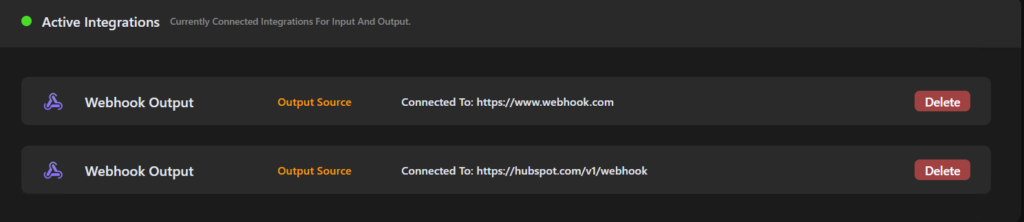
You can configure multiple webhook output integrations simultaneously, allowing processed document data to be delivered to several destinations at once.
Security Model for Webhook Document Ingestion
Docspire’s webhook integration is designed for secure, production-grade document ingestion. All communication is HTTPS-only, ensuring data is encrypted in transit. Every incoming request must include a valid X-Docspire-Secret header: requests without a matching secret key are rejected with a 401 response before any processing occurs.
Secret keys can be rotated at any time from the Integrations settings panel. For organisations running multiple document workflows, we recommend issuing a separate webhook configuration per workflow so that a compromised credential in one pipeline does not affect others.
Additional security best practices include validating file formats before sending to Docspire, implementing retry logic with exponential backoff in your source systems to handle transient failures, and monitoring webhook logs regularly for unexpected 401 or 400 responses. Never expose your secret key in client-side code or commit it to a public code repository. Store it as an environment variable or in a dedicated secrets manager.
Troubleshooting Common Webhook Document Ingestion Errors
The table below covers the most common errors and how to resolve them.
| Error | Likely cause | Resolution |
| 401 Unauthorized | Wrong or missing X-Docspire-Secret header | Check the secret key matches exactly. Update all connected systems after rotating. |
| 400 Bad Request | Invalid format or missing file field | Ensure Content-Type is multipart/form-data and the file field is named ‘files’. |
| Document not in queue | Field name mismatch or wrong content type | Confirm field name is ‘files’ (plural) and the method is POST. |
| Processing delayed | Large or complex document | Expected for high-page-count or scanned files. Poll the status endpoint periodically. |
| Credential error after regeneration | Old key still in use | Update every connected system immediately after rotating your secret key. |
| Output webhook fails to deliver | Target URL unreachable or wrong auth | Confirm the destination URL is accessible and authentication credentials are correct. |
| Connection timeout on output | Endpoint not responding or blocked | Verify the target is live and not blocked by a firewall. |
Summary: Making Document Ingestion a Real-Time, Automated Pipeline
Webhook document ingestion transforms one of the most friction-heavy parts of document workflows into a zero-touch, real-time event. Instead of relying on manual uploads, email forwarding, or scheduled batch jobs, every document from every system in your ecosystem arrives in Docspire the moment it is created.
For finance teams, this means invoices processed the instant they are received. For compliance teams, it means identity documents validated without a human manually triaging uploads. For operations, it means internal reports and data files feeding analytics pipelines continuously rather than once a day.
Docspire’s webhook integration, with its secret-key authentication, HTTPS-only communication, per-workflow credential management, and real-time processing queue, gives organisations a secure, scalable foundation for intelligent document automation. Whether you are processing dozens of documents a day or tens of thousands, the pipeline works the same way: instantly, automatically, and without manual intervention.
Ready to get started? Navigate to Automation > Integrations > Webhooks in your Docspire dashboard to generate your webhook URL and secret key. Your first automated document ingestion is less than five minutes away.
Automate Real-Time Document Ingestion with Docspire